SOC L1 Alert Triage
Summary
Description: A SOC, Security Operations Center, is a team of cyber security professionals (analysts) that continuously monitor an organization’s network 24/7.
Introduction
What is an SOC alert?
An SOC alert is a notification generated by security monitoring tools that flags a specific event or activity as potentially suspicious or malicious.
Events and Alerts
Introduction
At first events like logins, process launches or downloads are logged to an OS, a firewall, etc. which then are shipped to a security solution (SIEM, EDR, etc.). These flag only malicious anomalies and events which are then analyzed by the SOC team.
Alert Management Platforms
| Solution | Examples | Description |
|---|---|---|
| SIEM | Splunk ES, Elastic | Centralized log aggregator for cross-platform correlation and high-level visibility |
| EDR/NDR | MS Defender, CrowdStrike | Granular monitors for hosts and traffic that detect deep, technical threats in real-time |
| SOAR | Splunk SOAR, Cortex SOAR | Automation engine that executes “playbooks” to orchestrate workflows between different security tools |
| ITSM | Jira, TheHive | Administrative system of record for managing tickets, assignments, and incident documentation |
Questions
What is the number of alerts you see in the SOC dashboard?
Answer: 5
What is the name of the most recent alert you see?
Answer: Double-Extension File Creation
Alert Properties
Most common properties
| № | Property | Description | Examples |
|---|---|---|---|
| 1 | Alert Time | Shows alert creation time. Alert usually triggers a few minutes after the actual event | - Alert Time: March 21, 15:35 - Event Time: March 21, 15:32 |
| 2 | Alert Name | Provides a summary of what happened, based on the detection rule’s name | - Unusual Login Location - Email Marked as Phishing - Windows RDP Bruteforce - Potential Data Exfiltration |
| 3 | Alert Severity | Defines the urgency of the alert, initially set by detection engineers, but can be altered by analysts if needed | - (🟢) Low / Informational - (🟡) Medium / Moderate - (🟠) High / Severe - (🔴) Critical / Urgent |
| 4 | Alert Status | Informs if somebody is working on the alert or if the triage is done | - (🆕) New / Unassigned - (🔄) In Progress / Pending - (✅) Closed / Resolved - And often other custom statuses |
| 5 | Alert Verdict | Also called alert classification, explains if the alert is a real threat or noise | - (🔴) True Positive / Real Threat - (🟢) False Positive / No Threat - And often other custom verdicts |
| 6 | Alert Assignee | Shows the analyst that was assigned or assigned themselves to review the alert | - Assignee can sometimes be called alert owner - Assignee takes responsibility for their alerts |
| 7 | Alert Description | Explains what the alert is about, usually in three sections on the right | - The logic of the alert generating rule - Why this activity can indicate an attack - Optionally, how to triage this alert |
| 8 | Alert Fields | Provides SOC analysts’ comments and values on which the alert was triggered | - Affected Hostname - Entered Commandline - And many more, depending on the alert |
Questions
What was the verdict for the “Unusual VPN Login Location” alert?
Answer: False Positive
What user was mentioned in the “Unusual VPN Login Location” alert?
Answer: M.Clark
Alert Prioritisation
How to pick the right alert
- Filter the alerts
- Unassigned alerts
- Unresolved alerts
- Sort by severity
- Critical first
- Sort by time
- Oldest alert first
Questions
Should you first prioritise medium over low severity alerts? (Yea/Nay)
Answer: Yea
Should you first take the newest alerts and then the older ones? (Yea/Nay)
Answer: Nay
Assign yourself to the first-priority alert and change its status to In Progress.
The name of your selected alert will be the answer to the question. Answer: Potential Data Exfiltration
Alert Triage
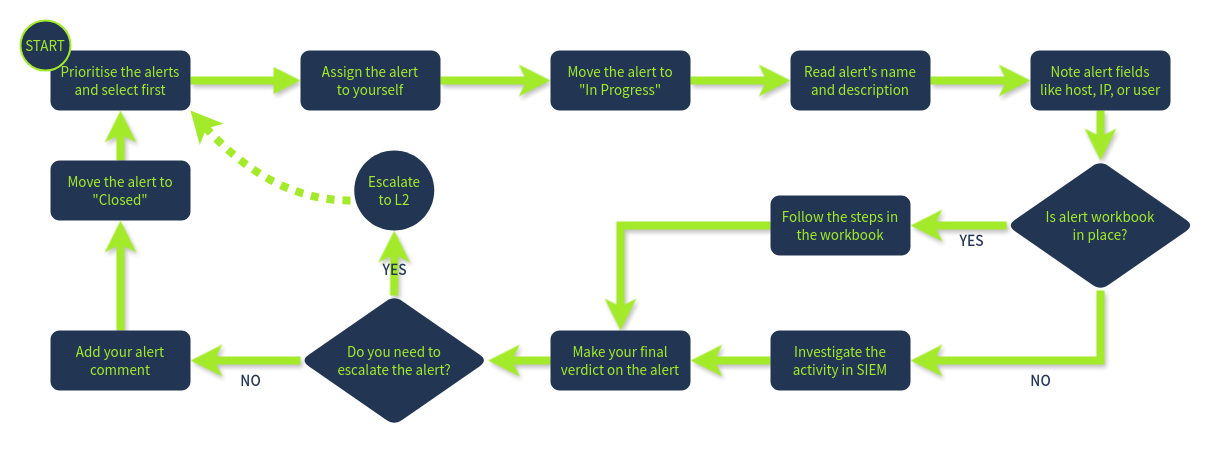
Initial Actions
Assign yourself an alert that is unassigned and unresolved, afterwards move it to “In Progress” and familiarize yourself with the alert details.
Investigation
Use experience and Workbooks/Playbooks to investigate the alert. Recommendations:
- Who is under threat? (User, Hostname)
- What is happening? (Malware, Login)
- Look at surrounding events (Events before and after)
- Utilize threat intelligence platforms to verify thoughts
Final Actions
- True or False Positive?
- Detailed comment on analysis
- Move to closed or escalate
Questions
Which flag did you receive after you correctly triaged the first-priority alert?
Answer: THM{looks_like_lots_of_zoom_meetings}
Which flag did you receive after you correctly triaged the second-priority alert?
Answer: THM{how_could_this_user_fall_for_it?}
Which flag did you receive after you correctly triaged the third-priority alert?
Answer: THM{should_we_allow_github_for_devs?}